Easy Invert
2.0.0.10Easy Invert: Useful application for enhancing the users visualization experience by applying various colors.
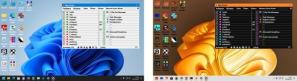
Easy Invert is an intuitive application that was designed to allow users to invert the colors on the entire desktop or apply filters to specified apps, which was added in Windows 10 Fall creator Update in order to allow users to improve their visualization experience and protect their eyes from bright screens at night.Since the program is portable, it means it doesn’t require installation, and it will allow users to copy and paste it on a removable USB drive without leaving any traces in the Windows registry.
The program will create an icon in the systray at startup and will provide users with access to its options using the right-click menu.
It will also apply normal or inverted greyscale effects, while also offering options for visually impaired people, thanks to deuteranopia, protanopia, and tritanopia effects.
Easy Invert is a very useful application for all users that want to enhance their visual experience when using Windows 10 Fall Creator Update, in order to apply various color filters.
Download Details
-
License:
Freeware
-
Platform:
Windows
- Publisher:
-
File size:
0.93 Mb
-
Updated:
Apr 30, 2023
-
User Rating:
4.3 / 5 (6 votes)
-
Editors' Review:
Not yet reviewed
-
Downloads:
1,164